AI Meeting Assistants in 2026: Features, Pricing and Use Cases
Meetings create a lot of useful information, but remembering everything discussed is difficult. Someone has to take notes, identify decisions, assign action items, and write follow-up messages. That work can take almost as long as the meeting itself.
An AI meeting assistant can handle much of this process automatically. These tools can record or process meetings, create transcripts, summarize discussions, identify action items, and make conversations searchable.
The market is also changing quickly. Some products focus mainly on transcription, while others connect meeting information with CRM systems, calendars, email, project management tools, and broader AI workflows.
This guide compares several widely used options and their current publicly listed plans and features as reviewed in September 2026.
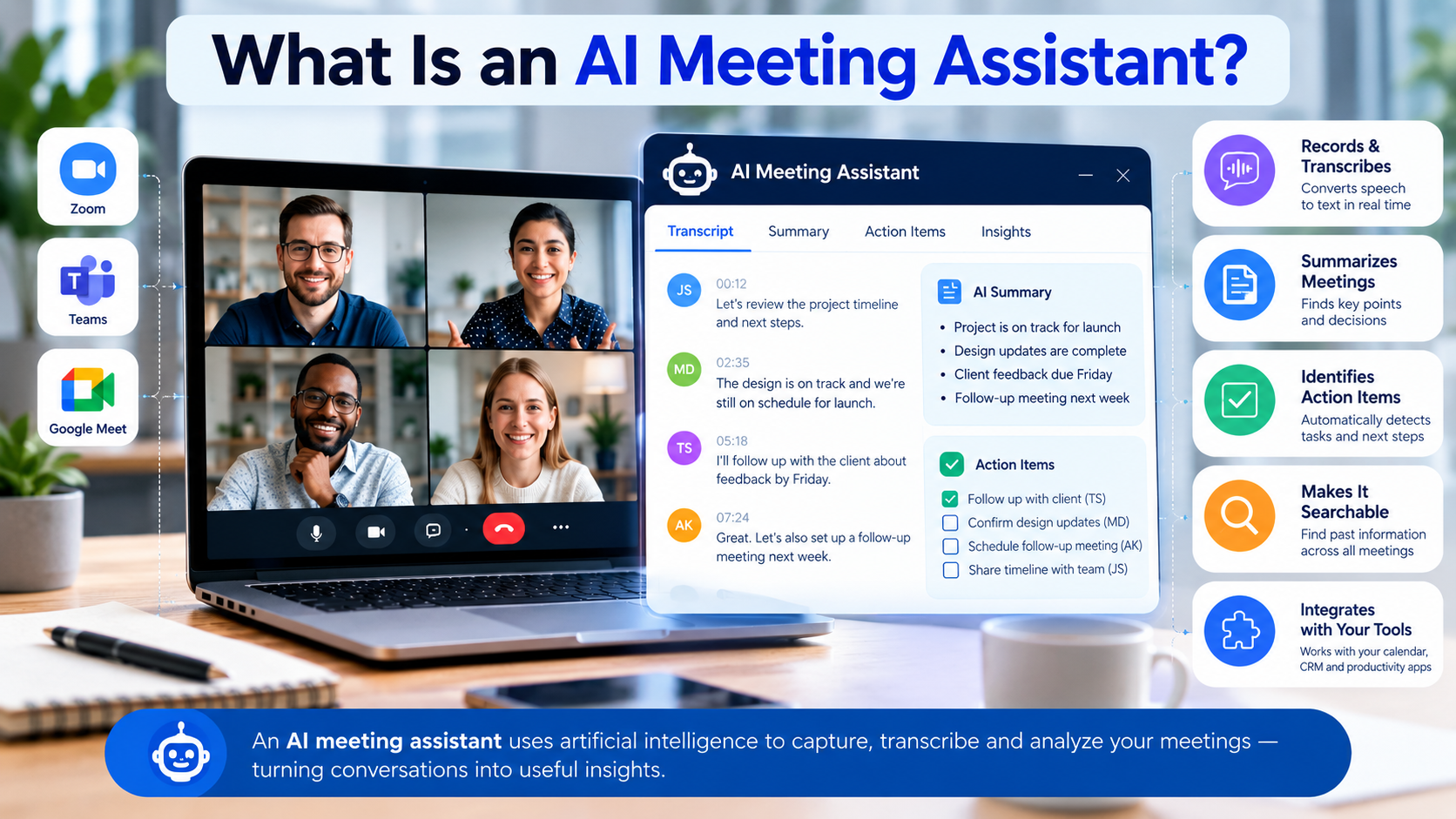
An AI meeting assistant is software that uses artificial intelligence to capture and analyze meeting conversations.
Depending on the product, it may:
- Record meetings
- Generate live or post-meeting transcripts
- Identify speakers
- Create summaries
- Extract decisions
- Detect action items
- Generate follow-up emails
- Search previous meetings
- Answer questions about meeting conversations
- Connect meeting information to CRM or productivity software
This makes an AI meeting assistant different from traditional meeting transcription software.
A basic transcription service primarily converts speech into text. A modern AI meeting assistant can go further by turning that transcript into structured information that people can actually use.
For example, instead of reading a 60-minute transcript, a manager might receive:
Decision: Launch the new product page next Tuesday.
Action: Sarah will update the pricing section.
Action: James will review the final copy.
Follow-up: Send the revised page to the marketing team.
That difference is important for businesses that hold many customer, sales, project, recruiting, or internal meetings.
How AI Meeting Assistants Work
Most AI meeting assistants follow a relatively simple workflow.
1. Meeting capture
The software connects to a supported meeting platform such as Zoom, Google Meet, or Microsoft Teams.
Some products join the meeting as an AI participant. Others use native meeting integrations or desktop applications.
2. Transcription
The conversation is converted into text. Speaker identification may also be applied so users can understand who said what.
3. AI analysis
The system analyzes the transcript to identify important information such as:
- Main discussion points
- Decisions
- Questions
- Action items
- Topics
- Follow-up requirements
4. Summary generation
The assistant creates a shorter version of the meeting.
Some products allow different summary templates for sales calls, interviews, project meetings, or one-to-one conversations.
5. Search and follow-up
More advanced platforms let users search previous meetings or ask questions about their meeting history.
This can turn a collection of meeting transcripts into a searchable knowledge base.
Key Features to Look For in Meeting Transcription Software
Not every AI meeting assistant offers the same capabilities. Before choosing one, look beyond the headline feature of “AI notes.”
Accurate transcription
Transcription quality is the foundation of the product.
Look for support for:
- Multiple accents
- Multiple languages
- Speaker identification
- Technical terminology
- Long meetings
- Noisy environments
An inaccurate transcript can lead to inaccurate summaries and action items.
AI meeting summaries
A useful summary should remove unnecessary conversation while preserving the information people need.
Good summaries typically include:
- Key points
- Decisions
- Questions
- Action items
- Next steps
Action item detection
This can be particularly useful for teams.
Instead of manually reviewing notes for tasks, the AI can identify potential commitments and organize them into action items.
However, users should still review automatically generated tasks before treating them as confirmed assignments.
Search across meetings
Search becomes more valuable as the number of recorded meetings grows.
For example, a sales manager might search previous conversations for:
“What did the customer say about implementation timing?”
Instead of opening individual recordings, the user can search the available meeting knowledge.
Integrations
Check whether the assistant works with the software your team already uses.
Common integrations include:
- Zoom
- Google Meet
- Microsoft Teams
- Slack
- Salesforce
- HubSpot
- Zapier
- Notion
- Jira
The exact integrations vary by provider and subscription.
Privacy and security
Meeting recordings can contain confidential business information.
Before enabling automatic recording, review:
- Data retention
- Encryption
- Access controls
- SSO
- Compliance certifications
- Data-processing terms
- Whether customer content is used for AI training
- Recording notifications and consent requirements
These considerations can be particularly important for healthcare, finance, legal, HR, and customer-facing teams.
AI Meeting Assistant Comparison for 2026
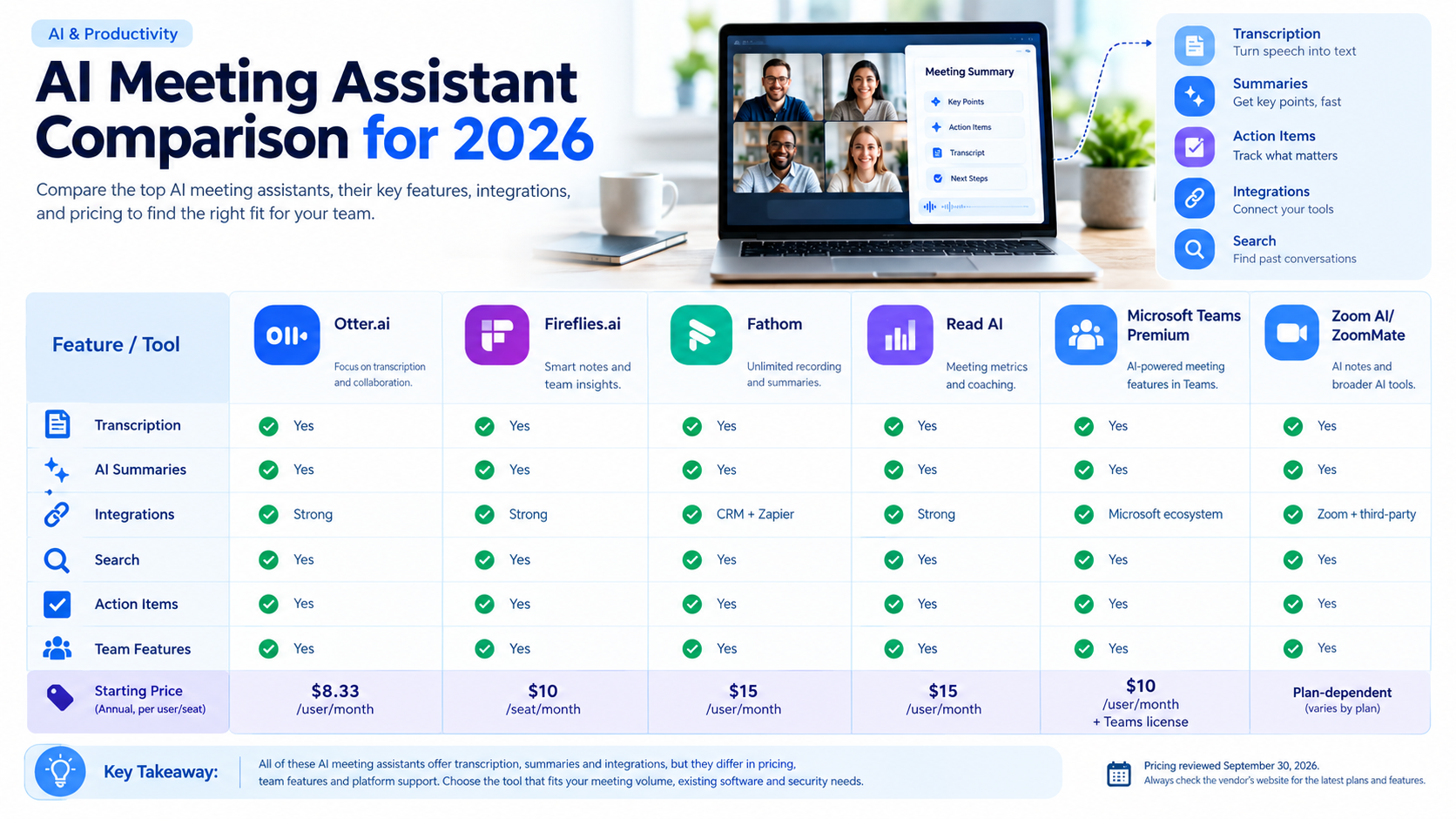
The following comparison uses publicly listed information reviewed in September 2026. Pricing can vary by billing cycle, region, taxes, promotions, and plan changes.
| AI Meeting Assistant | Free Option | Paid Starting Price* | Key Strengths | Meeting Platforms |
|---|---|---|---|---|
| Otter.ai | Yes | $8.33/user/month annually | Transcription, AI chat, summaries, workflows | Zoom, Teams, Google Meet |
| Fireflies.ai | Yes | $10/user/month annually | Transcription, AI summaries, search, integrations | Zoom, Meet, Teams + others |
| Fathom | Yes | $15/user/month | Unlimited recording/transcription, summaries | Zoom, Meet, Teams |
| Read AI | Yes | $15/user/month annually | Meeting metrics, summaries, integrations | Zoom, Teams, Meet |
| Microsoft Teams Premium | No standalone free tier | $10/user/month annually* | Intelligent recap, AI meeting features | Microsoft Teams |
| Zoom AI/ZoomMate | Limited free option | Plan-dependent | AI notes, summaries, workflows | Zoom + supported third-party meetings |
*Prices shown are publicly listed starting prices reviewed in September 2026 and may represent annual billing. Microsoft Teams Premium requires a Teams license. Zoom’s current AI offering includes different capabilities and pricing depending on the underlying Zoom plan.
Otter.ai
Otter.ai focuses heavily on transcription, meeting notes, AI chat, and meeting workflows.
Its current Basic plan is free and includes 300 monthly transcription minutes. The publicly listed Pro plan starts at $8.33 per user per month when billed annually, while the Business plan is listed at $20 per user per month on the annual pricing shown by Otter.
Otter supports Zoom, Microsoft Teams, and Google Meet and can automatically join meetings through calendar connections.
Pros
- Free plan available
- Live transcription
- Speaker identification
- AI chat
- Meeting summaries
- Supports major meeting platforms
- Business plans include multiple concurrent meetings
Cons
- Usage limits differ substantially between plans
- Some advanced capabilities require paid plans
- Larger organizations may need Enterprise features
Fireflies.ai
Fireflies.ai offers transcription, summaries, meeting search, AI assistance, integrations, and team-oriented features.
Its current pricing page lists a free plan, Pro at $10 per seat/month when billed annually, Business at $19 per seat/month annually, and Enterprise at $39 per seat/month annually. Monthly billing is available for Pro and Business.
Fireflies supports Zoom, Google Meet, Microsoft Teams, and other meeting environments.
Pros
- Free plan
- Unlimited transcription on listed plans
- Strong integration options
- Meeting search
- AI summaries
- Team analytics on higher tiers
Cons
- AI credits apply to some AI functionality
- Storage limits vary by plan
- Advanced team and security features require higher tiers
Fathom
Fathom takes a different approach to individual users.
Its free plan provides unlimited recordings, storage, and transcription, while advanced AI summaries and certain AI features have usage limits. Fathom’s current individual Premium plan is listed at $15 per user per month.
Fathom supports Zoom, Google Meet, and Microsoft Teams.
Pros
- Generous free offering
- Unlimited recordings and transcription
- AI action items on paid plans
- Follow-up email generation
- CRM integrations
- Multiple meeting platforms
Cons
- Advanced AI features have different limits by plan
- Team and enterprise features cost more
- Pricing structure has changed over time, so verify before purchase
Read AI
Read AI combines transcription with meeting metrics, summaries, meeting coaching, search, and integrations.
Its current Free plan allows five meeting transcripts per month. Pro is listed at $15 per user/month with annual billing, while Enterprise is $22.50 per user/month annually. Enterprise+ starts at $29.75 per user/month annually and adds additional security controls.
Read supports Zoom, Microsoft Teams, and Google Meet.
Pros
- Meeting metrics
- Personalized meeting coaching
- Unlimited transcripts on paid plans
- Multiple integrations
- Support for 20+ languages
- Mobile and desktop apps
Cons
- Free plan limits meetings
- Advanced security features require higher plans
- Workspace users need individual licenses
Microsoft Teams Premium
For companies already using Microsoft Teams, Teams Premium can provide AI-powered meeting capabilities without introducing a separate third-party meeting bot.
Microsoft lists Teams Premium at $10 per user/month when paid yearly, and it requires a Teams license. Features include intelligent meeting recap, AI-generated notes, and live translated transcription/captions.
Microsoft also states that intelligent recap is available through Teams Premium or a Microsoft Copilot license, subject to licensing and meeting policies.
Pros
- Integrated into Microsoft Teams
- Intelligent meeting recap
- AI-generated notes
- Translation features
- Suitable for Microsoft 365 environments
Cons
- Requires Microsoft Teams licensing
- Some capabilities require Copilot
- Less useful if your organization primarily uses other meeting platforms
Zoom AI / ZoomMate
Zoom has expanded its AI capabilities beyond simple meeting summaries.
Zoom’s current AI offering includes My Notes, meeting summaries, in-meeting questions, AI queries, and broader workflow and agent capabilities. The free ZoomMate Basic offering includes limited monthly meeting summaries and AI note-taking, while paid offerings provide more extensive AI capabilities.
Zoom also states that AI Companion is included at no additional cost with eligible paid Zoom services, although availability varies by product and region.
Pros
- Native Zoom integration
- AI meeting notes
- Meeting summaries
- Third-party meeting support for some features
- Broader AI workflow capabilities
Cons
- Pricing depends on the Zoom product and plan
- Some advanced features use separate AI plans or credits
- Feature availability can vary by region
Pros and Cons of Using an AI Meeting Assistant
Pros
- Reduces manual note-taking
- Makes meetings easier to review
- Creates searchable records
- Helps identify action items
- Supports remote and hybrid teams
- Can improve follow-up workflows
- Reduces the need to rewatch entire recordings
Cons
- Transcripts can contain errors
- AI summaries can miss context
- Recording creates privacy considerations
- Some features require expensive team plans
- Users may become overly dependent on automated notes
- Meeting participants may have consent or notification requirements depending on location and organizational policy
An AI meeting assistant should therefore support human decision-making rather than replace it.
How Much Does AI Meeting Transcription Software Cost?
There is no single pricing model across the market.
Some services offer generous free plans. Others charge per user, per month, with annual billing discounts.
For example, current listed annual prices include:
- Otter Pro: $8.33/user/month
- Fireflies Pro: $10/user/month
- Fathom Premium: $15/user/month
- Read AI Pro: $15/user/month
- Microsoft Teams Premium: $10/user/month, plus a qualifying Teams license
These are starting prices, not necessarily the total cost of ownership.
Simple Cost Example
Suppose a five-person team needs a $15-per-user monthly plan.
5 × $15 = $75 per month
Over one year:
$75 × 12 = $900 per year
The actual bill can be different because of annual discounts, taxes, additional licenses, plan changes, and optional services.
How to Choose an AI Meeting Assistant
Instead of choosing based only on the lowest price, consider how your team actually works.
For individuals
Look for:
- Free transcription
- Simple setup
- Good summaries
- Search
- Personal meeting history
A free plan may be sufficient if you only have a few meetings each week.
For sales teams
Prioritize:
- CRM integrations
- Action items
- Customer conversation search
- Sales summaries
- Follow-up automation
- Conversation intelligence
For project teams
Look for:
- Decision tracking
- Action items
- Searchable meeting history
- Integrations with project tools
- Team collaboration
For larger organizations
Security and administration become more important.
Check for:
- SSO
- SCIM
- Audit logs
- Data retention controls
- Compliance requirements
- Administrative reporting
- Access management
Privacy: What Should You Check Before Recording Meetings?
An AI meeting assistant can process sensitive information, so privacy should be part of the buying decision.
Before deploying one across a company, check:
- Does the tool notify participants that recording or transcription is active?
- Where is meeting data stored?
- How long is it retained?
- Who can access recordings and transcripts?
- Can administrators control retention?
- Is customer content used to train AI models?
- Does the service provide relevant compliance documentation?
For US and UK businesses, legal and organizational requirements can differ depending on the type of meeting, participants, data involved, and jurisdiction. Companies should check their own policies and obtain appropriate legal advice for high-risk situations.
Comparison/Cost Table
| Tool | Free Plan | Starting Paid Price | Transcription | AI Summaries | Integrations | Team Features |
|---|---|---|---|---|---|---|
| Otter.ai | Yes | $8.33/user/mo annually | Yes | Yes | Strong | Yes |
| Fireflies.ai | Yes | $10/user/mo annually | Yes | Yes | Strong | Yes |
| Fathom | Yes | $15/user/mo | Yes | Yes | CRM + Zapier | Yes |
| Read AI | Yes | $15/user/mo annually | Yes | Yes | Strong | Yes |
| Teams Premium | No standalone free tier | $10/user/mo annually | Yes | Yes | Microsoft ecosystem | Yes |
| Zoom AI/ZoomMate | Limited | Plan-dependent | Yes | Yes | Zoom + supported third-party platforms | Yes |
Pricing reviewed September 30, 2026. Always confirm the vendor’s pricing page before purchase because plans and promotional prices can change.
FAQs
1. What is an AI meeting assistant?
An AI meeting assistant is software that can capture meetings, transcribe conversations, summarize discussions, identify action items, and make meeting information searchable.
2. Is AI meeting transcription accurate?
Accuracy varies according to the software, audio quality, speakers, accents, terminology, and meeting environment. Important decisions and action items should always be reviewed by a person.
3. Can AI meeting assistants work with Zoom and Microsoft Teams?
Yes. Many popular tools support Zoom and Microsoft Teams. Otter, Fireflies, Fathom, and Read AI all list support for major meeting platforms, while Microsoft Teams Premium is built directly into the Teams ecosystem.
4. Are AI meeting assistants free?
Some are. Otter, Fireflies, Fathom, and Read AI currently offer free options, although their limits differ. Zoom also provides a limited free AI offering.
5. Can an AI meeting assistant create action items?
Yes. Many modern meeting assistants can identify potential action items. Some can also connect them to workflows or other productivity systems.
6. Do AI meeting assistants record every meeting automatically?
Not necessarily. Automatic recording depends on the product, account settings, calendar permissions, meeting platform, and organizational policies.
7. Are AI meeting assistants safe for confidential meetings?
They can provide security and privacy controls, but businesses should review each vendor’s data-processing terms, retention settings, access controls, compliance documentation, and recording policies before using them for confidential information.
8. Is meeting transcription software the same as an AI meeting assistant?
Not always. Traditional transcription software primarily converts speech to text. An AI meeting assistant generally adds summaries, action items, search, questions, integrations, or other analysis on top of the transcript.
Conclusion
AI meeting assistants have moved beyond simple transcription. Modern tools can turn conversations into searchable notes, summaries, action items, and follow-up workflows.
The right choice depends on how your organization holds meetings.
If you mainly need transcription and searchable notes, a dedicated meeting assistant may be enough. If your team works heavily in Microsoft Teams or Zoom, native AI capabilities may reduce the need for another application. Sales teams may need CRM integration and conversation intelligence, while larger organizations should give greater attention to administration, security, and retention controls.
Before buying, test the tool with real meetings. Check transcription quality, summary accuracy, integrations, storage limits, privacy controls, and the total cost for every user who actually needs a license.
That practical test is often more useful than choosing a tool based only on a feature list