I Customer Service Software for Small Businesses
Customer support can become difficult long before a business has a large support department.
A small online store might receive questions about shipping, returns, product availability, and payments throughout the day. A service company may spend hours answering the same questions by email. A growing SaaS company may have customers in different time zones who expect help outside normal business hours.
This is where AI customer service software can help.
Modern customer service platforms can answer common questions, suggest replies to human agents, summarize conversations, search a company knowledge base, classify tickets, and in some cases take actions on behalf of customers.
The important point is that AI should not simply be added because it is popular. A useful system should solve a real support problem while keeping humans involved when a conversation becomes complicated, sensitive, or outside the AI’s knowledge.
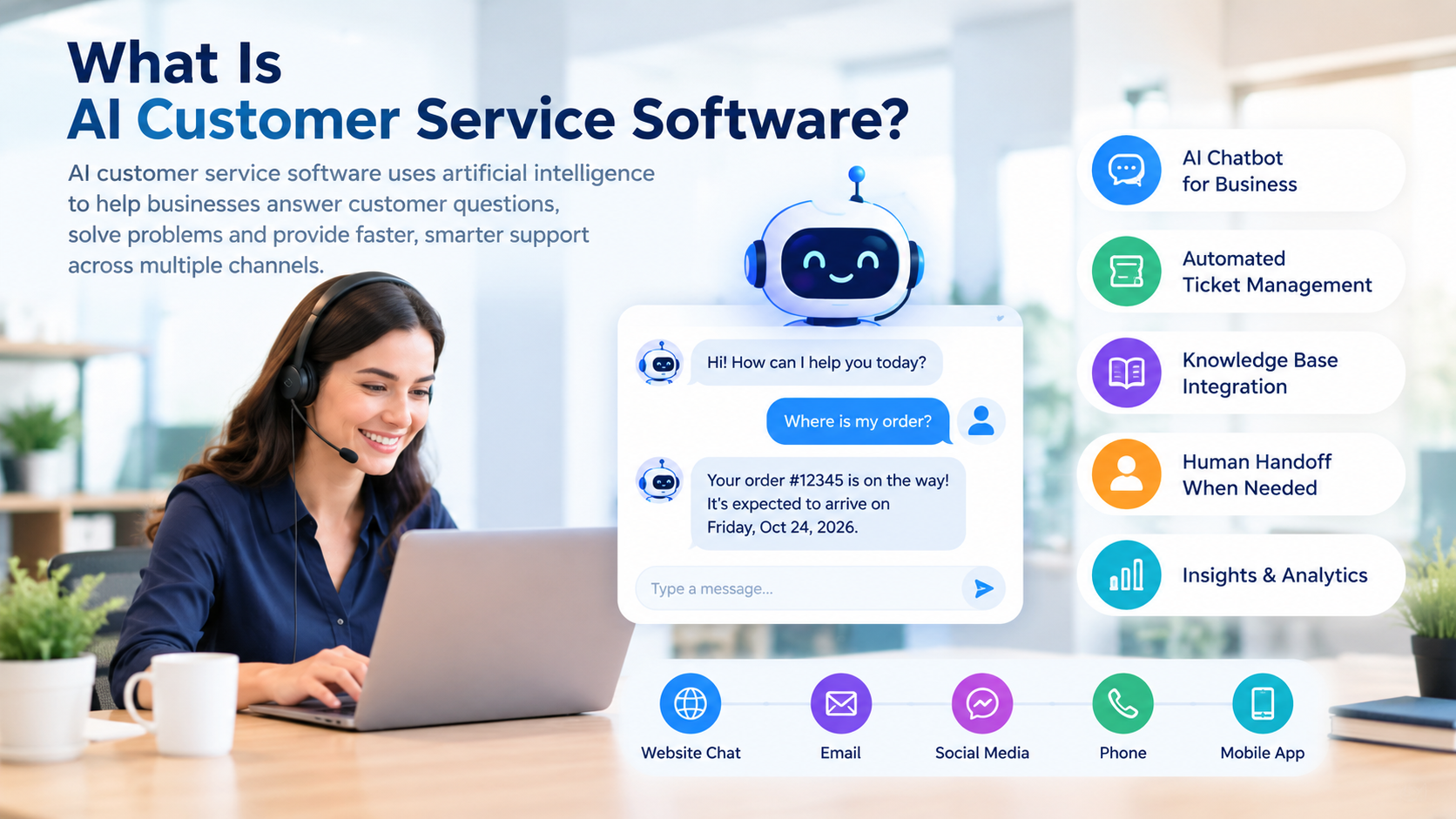
AI customer service software is support technology that uses artificial intelligence to help businesses communicate with customers and manage service requests.
Depending on the platform, an AI system may work through:
- Website chat
- Help centers
- Social messaging
- Voice channels
- Customer portals
- Support ticket systems
An AI chatbot for business is one common form of this technology. A chatbot can answer frequently asked questions and guide customers through basic problems.
More advanced AI customer service software can go beyond simple scripted conversations. It may understand natural-language questions, retrieve information from company documentation, summarize customer history, recommend actions, or complete approved workflows.
For example, instead of a customer asking:
“Where is my order?”
and receiving a generic link to a tracking page, an integrated AI agent could potentially retrieve the order status and provide a more specific response.
The exact capabilities depend on the software, integrations, permissions, and plan.
Why Small Businesses Are Using AI for Customer Service
Small businesses often have limited support resources.
The same employee may handle sales, operations, administration, and customer support. Repetitive questions can therefore consume time that could be spent on higher-value work.
AI can help with repetitive support tasks such as:
- Answering common questions
- Finding information in a knowledge base
- Creating ticket summaries
- Drafting email responses
- Categorizing incoming requests
- Routing conversations
- Providing support outside business hours
- Translating or assisting with multilingual conversations
- Collecting information before a human agent takes over
The goal is not necessarily to remove human support.
A better approach is often to let AI handle predictable requests while people focus on situations requiring judgment, empathy, negotiation, or access to sensitive information.
Key Features to Look For
Not every AI customer service platform works in the same way. Before choosing one, look beyond the word “AI.”
1. AI Chatbot and AI Agents
Basic chatbots usually answer predefined questions.
More advanced AI agents can understand customer requests and use connected information or workflows to help resolve them.
For a small business, the useful question is:
Can the AI solve the types of questions my customers actually ask?
A sophisticated AI system is not particularly valuable if it cannot access accurate product, order, account, or policy information.
2. Knowledge Base Integration
AI needs reliable information.
A strong customer service system should be able to use approved business content such as:
- FAQs
- Product documentation
- Return policies
- Shipping information
- Troubleshooting guides
- Internal support articles
Keeping this information updated is just as important as selecting the AI tool.
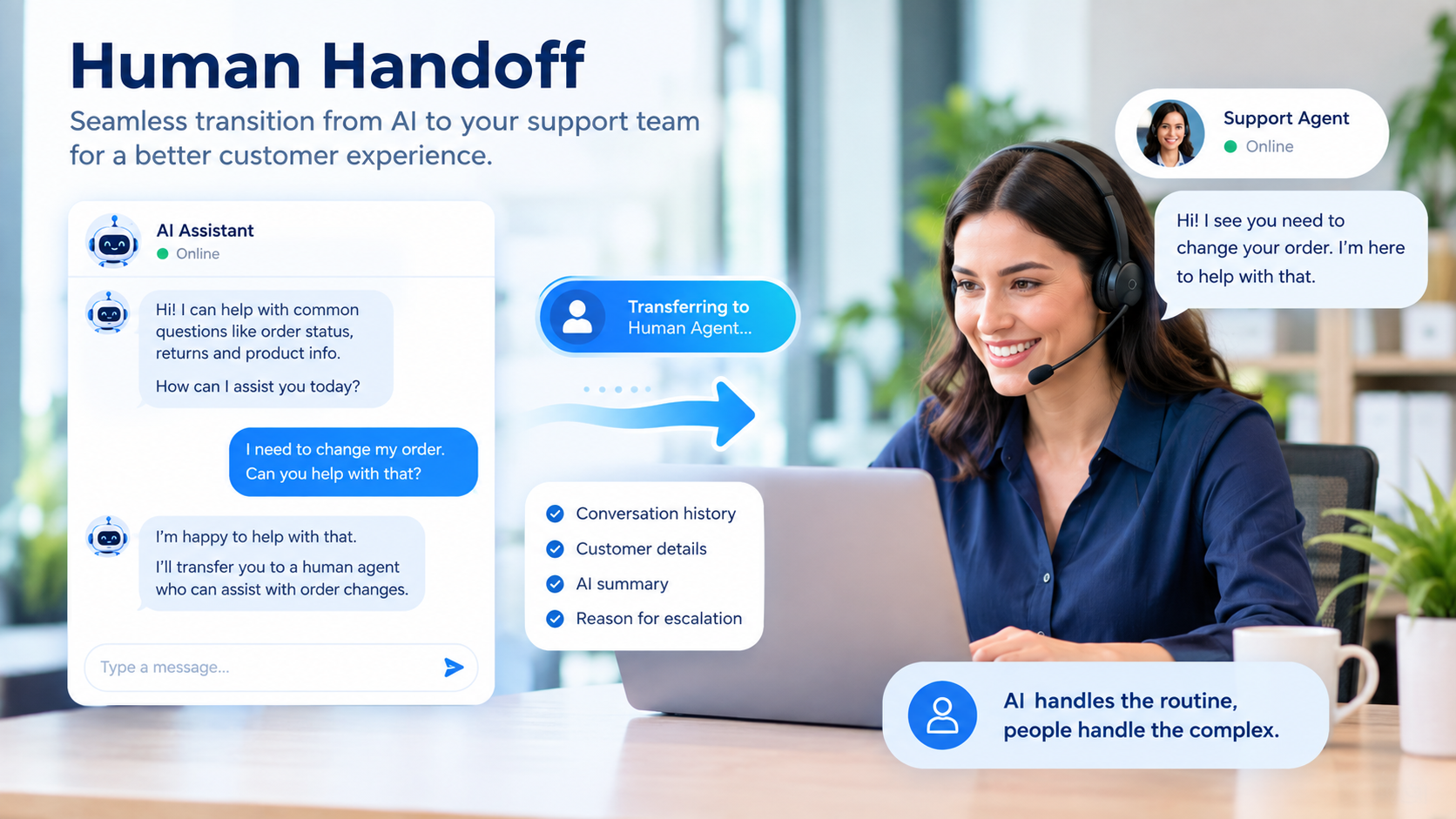
Customers should be able to reach a person when necessary.
Look for tools that can transfer conversations to human agents without forcing customers to repeat everything.
Useful handoff information can include:
- Conversation history
- Customer details
- AI-generated summary
- Previous troubleshooting steps
- Reason for escalation
4. Omnichannel Support
Some businesses only need website chat.
Others receive customer requests through email, social media, messaging apps, and phone calls.
If customers use several channels, consider whether the platform can bring those interactions into a unified support workflow.
5. Ticket Management
AI is more useful when it works alongside normal customer service processes.
Useful ticketing features can include:
- Assignment
- Prioritization
- Status tracking
- Automation
- Internal notes
- Reporting
- Service-level tracking
6. AI Agent Assistance
AI does not have to communicate directly with customers.
It can also help human agents.
Examples include:
- Drafting replies
- Summarizing long conversations
- Suggesting next steps
- Finding relevant knowledge articles
- Rewriting responses
- Translating messages
- Identifying customer sentiment or intent
This can be particularly useful for businesses that want AI assistance without fully automating customer conversations.
AI Customer Service Software Comparison
| Platform | AI/customer service approach | Pricing model to check | Useful for |
|---|---|---|---|
| Intercom + Fin | AI agent with helpdesk and messaging | Seat + AI outcome pricing | Startups and growing support teams |
| Zendesk | Helpdesk, omnichannel support and AI agents | Per-agent subscription + automated-resolution usage | Businesses building structured support operations |
| HubSpot Service Hub | Helpdesk, CRM and Customer Agent | Seat pricing + HubSpot Credits | Businesses already using HubSpot |
| Microsoft Dynamics 365 Customer Service | CRM-based service with AI capabilities | Per-user plans + AI/agent usage considerations | Businesses needing CRM integration |
| Salesforce Service + Agentforce | CRM service with AI agents | Per-user and consumption-based options | Businesses with Salesforce environments |
The table is a starting point rather than a universal ranking. The right option depends on your existing CRM, support channels, ticket volume, team size, integrations, and automation requirements.
Pros and Cons of AI Customer Service Software
Pros
- Can answer repetitive questions quickly
- Can provide support outside normal working hours
- Reduces some manual support work
- Helps agents find information faster
- Can summarize long conversations
- Can automate ticket classification and routing
- Can support multiple customer channels
- Can scale as customer volume increases
Cons
- AI can provide incorrect information
- Implementation requires planning
- Poor knowledge bases can produce poor answers
- Usage-based pricing can make costs harder to predict
- Complex integrations may require technical work
- Some customers still prefer human support
- Sensitive issues may require human judgment
- AI performance needs ongoing monitoring
The biggest mistake is treating AI as a replacement for a complete customer service strategy.
Performance: What Should You Measure?
Buying AI software is only the beginning.
A business should measure whether the system is actually improving customer service.
| Metric | What it tells you |
|---|---|
| First response time | How quickly customers receive an initial response |
| Resolution time | How long it takes to solve an issue |
| AI resolution rate | How many eligible conversations AI resolves |
| Escalation rate | How often conversations require human assistance |
| Customer satisfaction | Whether customers are happy with the support experience |
| Cost per resolution | Approximate support cost for each resolved request |
| Repeat contact rate | Whether customers need to ask the same question again |
| Agent productivity | How much manual work support employees save |
Do not focus on one number.
For example, a high AI resolution rate may look positive, but if customers are repeatedly contacting support because the answers are incomplete, the business has not actually solved the problem.
How Much Does AI Customer Service Software Cost?
AI customer service pricing can be difficult to compare because vendors use different models.
Common pricing structures include:
Per-agent pricing
You pay a monthly amount for each human support agent.
This can be relatively easy to budget when the team size is stable.
Per-resolution pricing
You pay when an AI system successfully resolves a qualifying customer interaction.
This connects cost more directly to AI usage, but monthly expenses can change with support volume.
Credit-based pricing
Some platforms use credits for AI actions or conversations.
The cost depends on how many credits your workflows consume.
Hybrid pricing
A platform may combine:
- Human-agent seats
- AI usage
- Messaging
- Voice
- Additional automation
- Premium integrations
This is why the advertised subscription price should not automatically be treated as the total cost.
Current Pricing Snapshot
Pricing reviewed for this article in October 2026:
| Platform | Example current published price | Pricing note |
|---|---|---|
| Intercom | From $29/seat/month annually + Fin from $0.99/outcome | Usage and channel charges can apply |
| Zendesk Suite Team | $55/agent/month annually | AI automated resolutions have separate usage considerations |
| HubSpot Service Hub Starter | From $7/seat/month annually | HubSpot Credits can apply to AI features |
| HubSpot Service Hub Professional | From $90/seat/month annually | Required onboarding and credit costs may affect total cost |
| Microsoft Dynamics 365 Customer Service Professional | $50/user/month annually | Higher tiers and AI/agent services have different pricing |
| Salesforce Agentforce | Consumption and per-user options | Pricing varies by Agentforce model and Salesforce edition |
These are published list prices and are not a like-for-like comparison. Taxes, billing terms, add-ons, usage, required products, implementation, and regional pricing can change the final amount.
Always confirm the vendor’s current pricing page before purchasing.
Example: Estimating AI Support Costs
Imagine a small ecommerce company receives 1,000 customer support conversations per month.
Suppose AI successfully handles 400 of them.
If a vendor charges $1 per qualifying AI resolution, the AI usage component would be approximately:
400 × $1 = $400 per month
That does not necessarily represent the company’s complete software bill.
The business may also pay for human-agent seats, the helpdesk, messaging channels, voice usage, integrations, or additional AI features.
The lesson is simple:
Calculate total support cost, not just the AI price.
How to Choose an AI Customer Service Software
Start with the problem instead of the software.
Step 1: Review Your Current Support Questions
Export or review recent tickets.
Group them into categories such as:
- Order status
- Returns
- Billing
- Account access
- Product questions
- Technical problems
- Complaints
- Sales questions
Look for repetitive requests.
These are usually the strongest candidates for automation.
Step 2: Check Your Knowledge Base
AI cannot reliably answer questions when the underlying information is outdated or contradictory.
Before launching an AI agent, update your:
- FAQs
- Policies
- Product information
- Troubleshooting instructions
- Shipping information
- Contact details
Step 3: Decide What AI Is Allowed to Do
Create clear boundaries.
For example:
AI may:
- Answer product questions
- Explain policies
- Provide order-status information
- Collect basic information
- Create tickets
AI may need human approval for:
- Refund exceptions
- Complaints
- Legal threats
- Sensitive account issues
- High-value customer disputes
- Unusual technical problems
Step 4: Test Before Full Deployment
Start with a limited group of questions.
Review the AI’s answers manually.
Look for:
- Incorrect information
- Missing context
- Hallucinated policies
- Poor escalation
- Unclear wording
- Repetitive responses
Step 5: Monitor After Launch
AI performance can change as products, policies, and customer questions change.
Review conversations regularly and update the knowledge base.
AI Chatbot vs. Human Customer Service
The choice does not have to be AI versus humans.
For many businesses, the practical model is AI plus humans.
| Task | AI | Human |
|---|---|---|
| FAQ answers | Strong fit | Sometimes unnecessary |
| Order status | Strong fit when integrated | Backup |
| Basic troubleshooting | Strong fit | Escalation |
| Complex complaint | Limited | Strong fit |
| Negotiation | Limited | Strong fit |
| Sensitive customer issue | Usually escalate | Strong fit |
| Repetitive ticket summaries | Strong fit | Review when needed |
| High-value relationship management | Support role | Strong fit |
The best workflow depends on the business.
AI can handle predictable work while employees concentrate on cases where human judgment adds more value.
Common Mistakes to Avoid
Automating Everything
Not every customer interaction should be automated.
A customer dealing with a serious billing problem may need a person immediately.
Using Outdated Information
AI trained or connected to old policies can give customers the wrong answer.
Hiding the Human Option
Customers should not have to fight with a chatbot to reach support.
Ignoring Costs
A low starting price does not necessarily mean a low total cost.
Check usage-based charges and required add-ons.
Measuring Only Automation
Automation is not the final goal.
Customer satisfaction, resolution quality, repeat contacts, and support costs matter too.
Is AI Customer Service Software Worth It for a Small Business?
It can be useful when a business has a meaningful amount of repetitive customer support work.
The strongest use cases are usually predictable questions with clear answers.
Examples include:
- “What are your delivery times?”
- “How do I reset my password?”
- “What is your return policy?”
- “Do you ship to my country?”
- “How can I update my account details?”
More complicated questions may still require human support.
A small business does not necessarily need the most advanced AI platform. It needs a system that fits its support volume, customer expectations, existing software, and budget.
FAQs
1. What is AI customer service software?
AI customer service software uses artificial intelligence to help businesses answer customer questions, manage support requests, assist human agents, automate workflows, and provide self-service support.
An AI chatbot for business is software that communicates with customers using natural language. Depending on its integrations and permissions, it can answer questions, find information, collect customer details, and sometimes perform actions.
3. Is AI customer service suitable for small businesses?
Yes. Small businesses can use AI for repetitive questions, basic troubleshooting, ticket classification, customer self-service, and agent assistance. The appropriate level of automation depends on support volume and business complexity.
4. Can AI completely replace customer service agents?
For most businesses, AI should be treated as an additional support layer rather than a complete replacement for human service. Complex, sensitive, or unusual situations often require human judgment.
5. How much does AI customer service software cost?
Pricing varies widely. Some platforms charge per support agent, while others charge for AI resolutions, conversations, credits, or a combination of these models. Always calculate the complete software and usage cost.
6. What should I look for in an AI customer service platform?
Look for accurate knowledge-base integration, human handoff, ticket management, useful analytics, appropriate integrations, security controls, transparent pricing, and AI capabilities that match your actual customer questions.
7. Does an AI chatbot improve customer service?
It can improve speed and reduce repetitive work when properly configured. Results depend on the quality of the knowledge base, integrations, workflows, escalation process, and ongoing monitoring.
8. Should a small business start with an AI chatbot or a full customer service platform?
A business with simple website questions may start with a chatbot. A business managing email, tickets, multiple channels, CRM data, and a support team may need a broader customer service platform.
Conclusion
AI customer service software can give small businesses another way to handle repetitive support work without requiring every question to reach a human employee.
The most useful approach is not to automate customer service blindly.
Start by reviewing real support conversations. Identify repetitive questions. Improve your knowledge base. Choose an AI tool that integrates with the systems your business already uses. Set clear rules for escalation and measure results after launch.
For some businesses, an AI chatbot may be enough. Others may benefit from a complete helpdesk with AI agents, CRM integration, automation, and human-agent assistance.
The right choice is the one that solves your actual support problems while keeping the customer experience clear, accurate, and easy t