Article
Running a small business becomes harder when customer information is spread across spreadsheets, inboxes, notes and different apps. A good CRM brings those details into one place so you can track leads, manage customer relationships and see what is happening in your sales pipeline.
The best CRM software is not necessarily the platform with the longest feature list. For a small business, the right choice depends on your number of users, sales process, required integrations, automation needs and budget.
This guide compares several widely used CRM options, including HubSpot, Zoho CRM, Salesforce and Pipedrive, using current vendor information reviewed in October 2026.
What Is CRM Software?
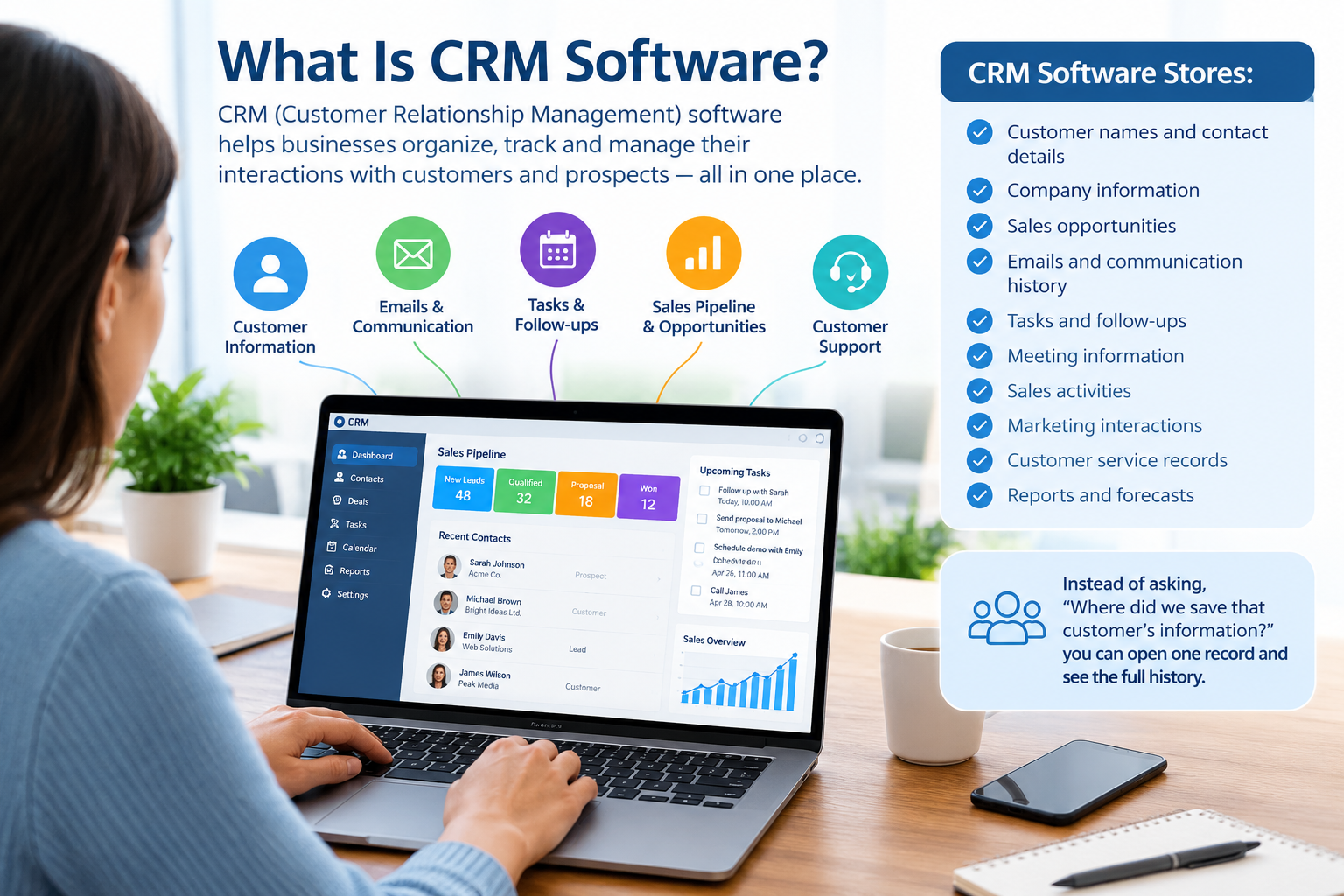
CRM stands for Customer Relationship Management.
CRM software helps businesses organise information about prospects and customers. Depending on the platform, it can store:
- Customer names and contact details
- Company information
- Sales opportunities
- Emails and communication history
- Tasks and follow-ups
- Meeting information
- Sales activities
- Marketing interactions
- Customer service records
- Reports and forecasts
Instead of asking, “Where did we save that customer’s information?”, a sales team can open one customer record and see the relevant history.
How CRM Works for a Small Business
Imagine a five-person consulting company.
A potential customer fills out a website form. The CRM can create a lead record, assign it to a salesperson and place the opportunity into a sales pipeline.
The salesperson can then:
- Contact the lead.
- Record the conversation.
- Schedule a follow-up.
- Move the opportunity through different sales stages.
- Record the expected deal value.
- Mark the deal as won or lost.
This creates a repeatable process instead of relying on memory or spreadsheets.
Why Use a CRM for Small Business?
A CRM can be useful when customer information and sales activity start becoming difficult to manage manually.
1. Centralised Customer Information
A CRM gives your team a shared location for customer and prospect information.
This is particularly useful when several employees communicate with the same customer.
2. Better Lead Management
Leads can be organised according to source, status, industry, location, deal value or other criteria supported by the CRM.
3. Sales Pipeline Visibility
A visual pipeline can show which opportunities are new, progressing, stalled or closed.
This helps managers understand what is happening without asking every salesperson for an update.
4. Automated Follow-Ups
Many CRM platforms provide workflows, reminders or other automation tools.
For example, a CRM could remind a salesperson to follow up three days after a proposal is sent.
5. Reporting
CRM reports can help businesses monitor sales activity, pipeline value, conversion activity and other metrics.
The exact reporting capabilities depend on the CRM and subscription plan.
Key Features to Look for in the Best CRM Software
Not every small business needs every CRM feature. Focus on the capabilities that match your actual workflow.
Contact and Lead Management
Basic contact management should make it easy to create, update and search customer records.
Look for:
- Contact records
- Company records
- Lead tracking
- Custom fields
- Import tools
- Duplicate management
- Activity history
Sales Pipeline Management
A useful CRM should make your sales process easy to understand.
Typical stages might be:
New Lead → Qualified → Proposal → Negotiation → Won/Lost
The exact stages should match your business rather than being copied from another company.
Email and Communication Tracking
Email integration can reduce the need to manually record every customer interaction.
Depending on the platform, you may also find:
- Email templates
- Meeting scheduling
- Calling
- Conversation history
- Email tracking
- Communication automation
Workflow Automation
Automation becomes more valuable as a company grows.
Examples include:
- Assigning new leads
- Creating follow-up tasks
- Updating deal stages
- Sending notifications
- Triggering internal workflows
Reporting and Analytics
At minimum, consider whether the CRM can help you answer questions such as:
- How many active deals do we have?
- What is the pipeline value?
- Which salespeople have open opportunities?
- Where are leads coming from?
- How many deals are won or lost?
Integrations
A CRM should fit into the software your business already uses.
Potential integrations include:
- Calendar
- Accounting software
- Marketing platforms
- Customer support tools
- E-commerce systems
- Communication platforms
- Business intelligence tools
Best CRM Software Options Compared
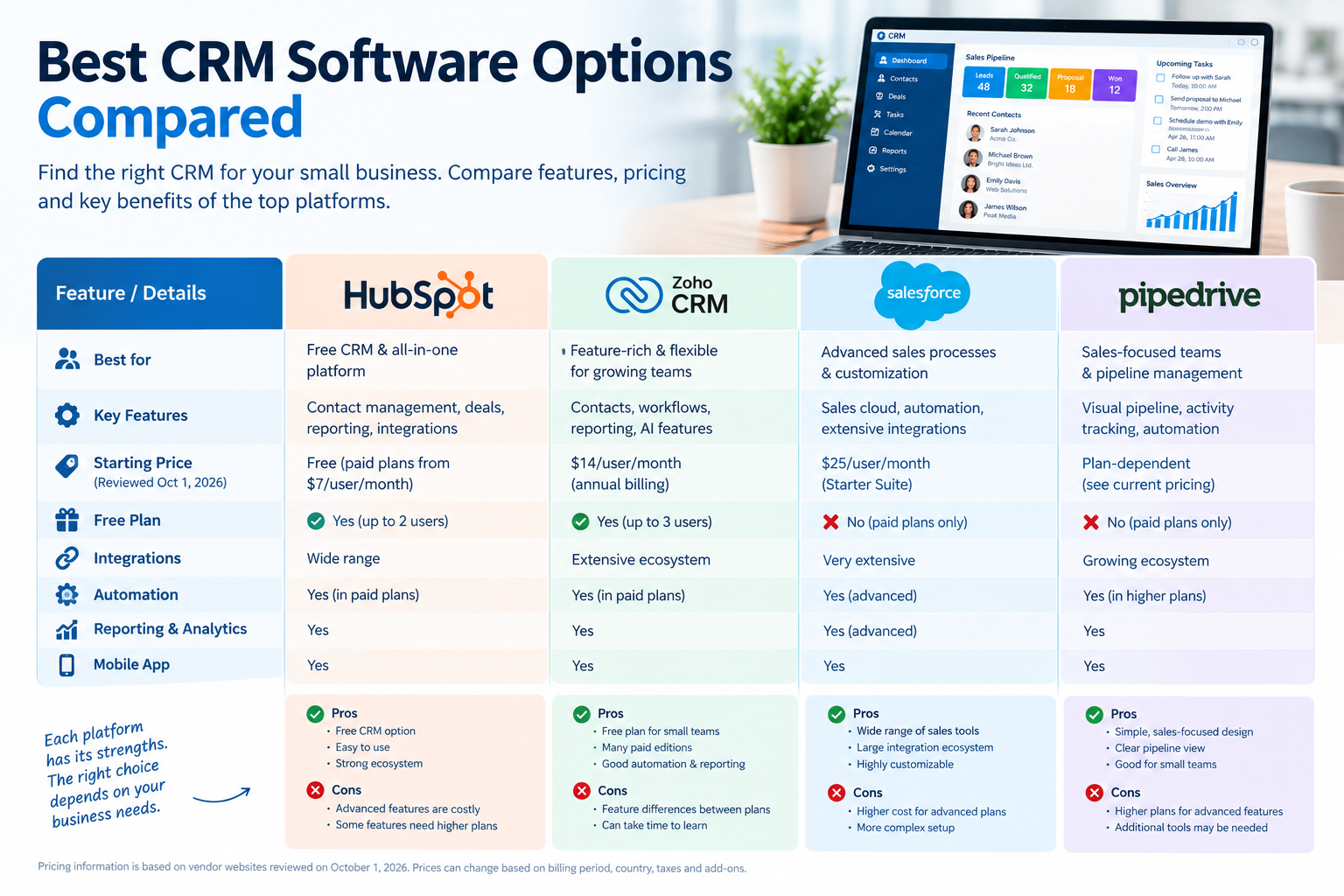
There is no single CRM that fits every small business. The following platforms take different approaches to CRM and sales management.
| CRM | Useful for | Notable characteristics | Starting pricing reviewed |
|---|---|---|---|
| HubSpot | Businesses wanting a free starting point and broader customer platform | Free CRM, contact management, deal pipelines and reporting | Free; paid options vary |
| Zoho CRM | Small businesses wanting a broad feature set and multiple editions | Contact/deal management, workflows, reporting and AI features | From $14/user/month annually |
| Salesforce | Businesses expecting more advanced sales processes | Sales Cloud editions, extensive ecosystem and customization | From $25/user/month |
| Pipedrive | Sales-focused teams | Pipeline-oriented workflow and sales activity management | Plan and billing dependent |
Pricing is based on vendor pages reviewed on October 1, 2026. Prices can change, may vary by billing period, country, taxes, promotions and required add-ons.
HubSpot CRM
HubSpot offers a free CRM with contact management, deal pipelines, CRM import and reporting tools. HubSpot states that its free CRM is available without an expiration date and is free for up to two users.
Pros
- Free entry-level CRM
- Contact and deal management
- Reporting tools
- Broad ecosystem of sales, marketing and service products
- Suitable for businesses that want to start small and expand
Cons
- Advanced functionality can become considerably more expensive
- Some features require higher plans
- Pricing depends on the specific HubSpot products and seats purchased
HubSpot’s current Sales Hub pricing page lists Free at $0, Starter from $7 per seat, Professional from $90 per seat and Enterprise from $150 per seat under the displayed pricing structure. Some plans have additional requirements or onboarding costs.
Zoho CRM
Zoho provides CRM editions ranging from a free plan to higher-level plans for businesses needing more functionality.
Zoho’s current pricing calculator lists Standard at $14/user/month, Professional at $23, Enterprise at $40, and Ultimate at $52, based on annual pricing. Zoho notes that local taxes can be added to these prices.
Zoho also offers a free CRM edition for up to three users with features including contact management, follow-up reminders, workflows, email templates, activities, reports and APIs.
Pros
- Free option for small teams
- Multiple paid editions
- Workflow automation
- Reporting and dashboards
- AI-related features
- Broad business software ecosystem
Cons
- Feature differences between editions require careful comparison
- Advanced configurations may take more time to learn
- Add-ons can increase the total cost
Salesforce Sales Cloud
Salesforce is a major CRM platform with editions designed for different levels of sales management.
Salesforce’s current pricing page lists Sales Cloud editions including Starter Suite at $25/user/month, Pro Suite at $100, Enterprise at $175, and Unlimited at $350. Salesforce also lists a free suite and Agentforce 1 Sales at $550/user/month on the page reviewed.
Pros
- Wide range of sales capabilities
- Large integration ecosystem
- Advanced customization
- Suitable for complex sales processes
- Multiple editions for different requirements
Cons
- Higher-tier plans can be expensive
- Configuration can be more involved
- Small teams may not need its more advanced capabilities
Pipedrive
Pipedrive focuses heavily on sales pipeline management.
Pipedrive changed its plan structure in 2025 and now uses Lite, Growth, Premium and Ultimate plans. Its documentation also lists different usage limits for each plan, including limits around leads, deals, custom fields, reports and automation.
Pros
- Sales-focused approach
- Strong pipeline concept
- Useful for teams that want a clear view of opportunities
- Different plans for different levels of functionality
Cons
- Advanced requirements can require higher plans
- Businesses needing a broad all-in-one customer platform may need additional tools
- Usage limits should be checked before purchasing
How Much Does CRM Software Cost?
CRM costs vary widely.
A small company may start with a free CRM, while a growing sales organisation may spend hundreds or thousands of dollars per month.
The advertised subscription price is also not always the complete cost.
Consider:
Total CRM cost = subscription + onboarding + integrations + migration + training + add-ons
For example, suppose five employees use a CRM costing $25 per user each month:
5 × $25 = $125 per month
That equals:
$125 × 12 = $1,500 per year
But the real cost could be higher if you need paid integrations, additional storage, implementation help or premium support.
CRM Pricing Comparison
| Platform | Example entry pricing reviewed | Pricing model | Important consideration |
|---|---|---|---|
| HubSpot | $0 free CRM; paid plans available | Free / per-seat depending on product | Advanced products can increase costs |
| Zoho CRM | $14/user/month Standard annually | Per user | Higher editions add capabilities |
| Salesforce | $25/user/month Starter Suite | Per user | Higher editions cost significantly more |
| Pipedrive | Plan-dependent | Per user | Check current plan limits and billing |
Pricing checked October 1, 2026. Vendor pricing, promotions, taxes and packaging can change. Always confirm the final price on the vendor’s pricing page before purchasing.
How to Choose a CRM for Small Business
Start with your business process instead of starting with software features.
Step 1: Define Your Sales Process
Write down what happens from the first customer contact to the completed sale.
If your process has only a few steps, a complicated CRM may add unnecessary work.
Step 2: Count Your Users
Calculate how many employees actually need paid access.
A CRM that looks inexpensive per user can become expensive when 20 or 30 employees need licenses.
Step 3: Identify Required Integrations
Make a list of the tools your business already uses.
Check whether each CRM supports those integrations natively or through third-party connectors.
Step 4: Check Automation Requirements
Decide which repetitive tasks you want to automate.
Do not pay for advanced automation simply because it is available.
Step 5: Consider Data Migration
If your customer information currently lives in spreadsheets, check:
- Import formats
- Duplicate handling
- Data fields
- Historical records
- Migration assistance
Step 6: Test Before You Commit
Use a free plan or trial when available.
Create several realistic customer records and test your actual workflow instead of simply clicking through a product demo.
CRM Data Privacy for UK Businesses
Businesses operating in the UK should consider data protection requirements when selecting and configuring CRM software.
The Information Commissioner’s Office says that where direct marketing uses personal information, businesses need to comply with the UK data protection regime. Electronic marketing can also be subject to the Privacy and Electronic Communications Regulations (PECR).
For example, a CRM may store names, email addresses, phone numbers and communication histories. Businesses should consider:
- Why the information is being collected
- The lawful basis for processing
- Transparency and privacy information
- Data retention
- Marketing preferences
- Access controls
- Security
- Individuals’ rights
The exact obligations depend on the business, data and activity, so UK businesses should use current ICO guidance and obtain professional advice where appropriate.
Common CRM Mistakes Small Businesses Should Avoid
Buying Too Many Features
A long feature list does not automatically mean better results.
Choose features that solve real business problems.
Ignoring User Adoption
A CRM only works when employees actually use it.
Keep the initial process simple and provide clear training.
Entering Poor-Quality Data
Duplicate or incomplete customer records can make a CRM less useful.
Create simple rules for data entry from the beginning.
Forgetting the Total Cost
Look beyond the advertised monthly subscription.
Include implementation, integrations, training and additional licenses in your budget.
Automating Too Early
Automation should support a proven process.
If the underlying sales process is confusing, automation can simply make the confusion happen faster.
CRM Features Checklist
Before choosing a CRM, ask:
- Does it manage contacts and companies?
- Can it track leads?
- Does it provide a visual sales pipeline?
- Can users record customer activities?
- Does it integrate with our email and calendar?
- Does it provide useful reports?
- Can we automate repetitive tasks?
- Can we import existing data?
- Does it have suitable mobile access?
- Can it scale as the business grows?
- Are the security and privacy controls appropriate?
- What will the total annual cost be?
A CRM that meets these practical requirements can be more useful than a platform with dozens of features your team never uses.
FAQs
1. What is the best CRM software for a small business?
There is no single CRM that is suitable for every small business. The right option depends on your team size, sales process, required features, integrations and budget. Free and entry-level options from providers such as HubSpot and Zoho can be useful starting points, while Salesforce and other platforms offer more advanced configurations.
2. What is the best free CRM for small business?
Several providers offer free CRM functionality. HubSpot currently offers a free CRM with contact management, deal pipelines and reporting, while Zoho offers a free CRM edition for up to three users.
3. How much does CRM software cost?
CRM software can cost $0 or hundreds of dollars per user each month, depending on the provider and plan. Zoho, for example, lists Standard at $14/user/month with annual billing, while Salesforce lists its Starter Suite at $25/user/month.
4. Is CRM software worth it for a small business?
It can be valuable when customer information, leads and follow-ups are becoming difficult to manage manually. The value depends on whether the CRM saves time, improves visibility and supports a repeatable sales process.
5. Can a CRM replace spreadsheets?
A CRM can replace many spreadsheet-based sales and contact-management tasks, but the migration should be planned carefully. Businesses should clean their data and decide which information actually needs to move into the new system.
6. What CRM features should a small business prioritise?
Start with contact management, lead tracking, pipeline management, communication history, reporting, integrations and basic automation. More advanced features should be considered according to your actual workflow.
7. Should a small business choose a free CRM?
A free CRM can be a practical way to start if its user, feature and data limits fit the business. Before choosing one, check whether the features you need remain available on the free plan as your business grows.
8. What should UK businesses consider when using CRM data?
UK businesses should consider applicable data protection and electronic marketing rules. The ICO states that UK GDPR and PECR can apply to direct marketing involving personal information.
Conclusion
Choosing CRM software is less about finding the platform with the most features and more about matching the software to the way your business actually works.
A small company may need little more than contact management, a sales pipeline and follow-up reminders. A growing organisation may need automation, advanced reporting, integrations, customisation and stronger administrative controls.
Before purchasing, compare the total cost, required features, user limits, integrations and expected growth. Test the CRM using real-world sales scenarios whenever possible.
The practical next step is simple: write down your sales process, identify the three to five CRM features you actually need, calculate your expected user count and then compare plans based on those requirements.