 Customers increasingly expect businesses to respond quickly, whether they are asking about delivery, checking a booking, requesting a product recommendation, or seeking help with an existing order.
For a small business with a limited support team, answering the same questions repeatedly can take up valuable time. Hiring additional staff may not be practical, particularly when customer enquiries fluctuate throughout the week.
This is where AI customer service software can help.
Modern AI chatbots can use a business’s website content, help articles, product information, and approved business documents to respond to customer questions. Depending on the platform and integrations, some can also collect leads, provide order information, route enquiries to staff, and support customers across multiple channels.
However, AI chatbots are not a complete replacement for human customer service. Their accuracy depends on the quality of the information and the tasks they are authorised to perform. Sensitive requests, complaints, unusual situations, and decisions involving refunds or account access may still require a person.
For small businesses in the USA and UK, the practical question is not simply which chatbot has the most features. It is which one fits the business’s budget, existing software, customer communication channels, and support requirements.
1. Best AI chatbots for small businesses: Quick comparison
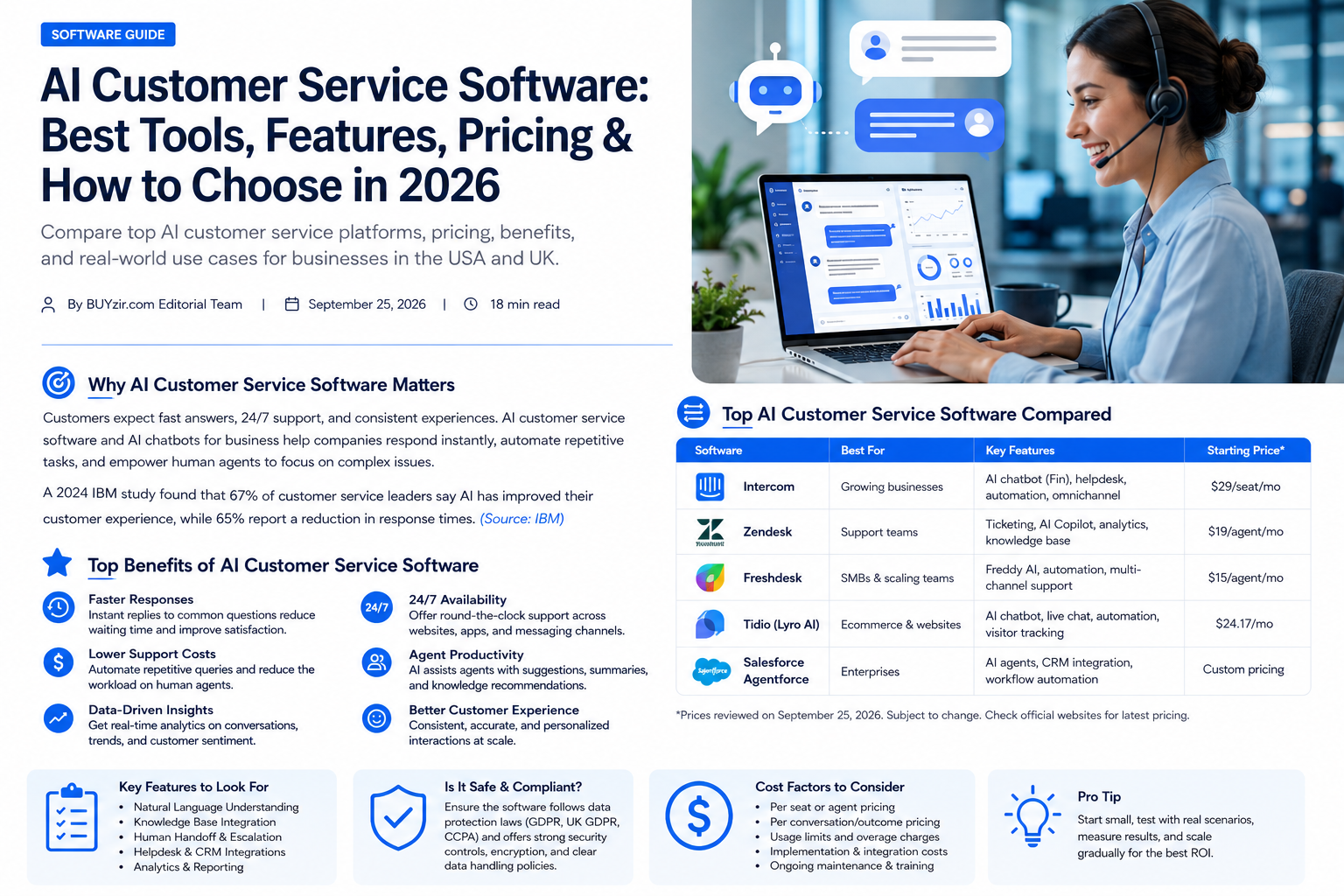
The following platforms cover different small-business needs, from simple website chat to AI-powered helpdesks and automated customer support.
This is a use-case-based shortlist, not a universal ranking. Features, subscription prices, usage allowances, and availability can change, so check the vendor’s current plan and contract before purchasing.
The descriptions below are based on vendor product information and published comparison sources available in September 2026.
|
AI chatbot software |
Suitable business use |
Main capabilities |
|---|---|---|
|
Tidio |
Small online shops and service businesses |
Website chat, automated flows, Lyro AI |
|
HubSpot |
Businesses using CRM and sales tools |
Customer records, sales and service workflows |
|
Zendesk |
Growing support teams |
Ticketing, AI agents, knowledge base, omnichannel support |
|
Intercom |
SaaS and digital businesses |
AI support agent, live chat, customer messaging |
|
Zoho Desk |
Budget-conscious support teams |
Ticket management, automation, Zoho integrations |
|
Gorgias |
Ecommerce and Shopify stores |
Order-related support, ecommerce integrations |
|
Help Scout |
Small teams preferring personal service |
Shared inbox, help centre, AI assistance |
|
Holp |
UK businesses and service providers |
Website-based AI answers, multilingual support |
|
Hey Support |
Small businesses wanting a managed chatbot |
Website chat, lead capture, booking and handoff |
Sources:
The table is intended as a starting point. Some products are complete helpdesk systems with AI added, while others concentrate on deploying an AI assistant on a website. That difference affects both cost and setup.
2. Detailed reviews of the best AI chatbots for business
1. Tidio — AI chat for small businesses and online stores

Tidio combines website live chat, chatbot automation, and its Lyro AI customer service agent. It is designed for businesses that want to offer customer assistance on their websites without building an entire support system from scratch.
For small ecommerce businesses, a chatbot can answer questions about shipping, returns, product information, and store policies. Automated chat flows can also guide visitors toward relevant pages or collect contact details.
Key features
-
AI-powered responses based on business knowledge.
-
Website chat and automated conversation flows.
-
Options for human support when a question needs personal attention.
-
Ecommerce integrations and tools for managing customer conversations.
Who should consider it?
Small online stores, independent retailers, and service businesses that receive frequent website enquiries and want a relatively straightforward way to introduce AI chat.
Pricing: Tidio has offered a free entry-level option and paid plans. A June 2026 industry comparison listed its Starter plan at $29 per month annually, but current pricing, AI conversation allowances, and add-ons should be confirmed directly with the vendor.
Potential limitation: Businesses with high conversation volumes should check the included AI usage and additional charges. A basic live chat subscription is not necessarily equivalent to unlimited AI-powered support.
Official website:
.
2. HubSpot — AI customer service for businesses using a CRM

HubSpot is worth evaluating if a small business already uses HubSpot to manage customer relationships, marketing, or sales.
Its customer service tools connect support activity with customer records, making it easier for staff to understand a customer’s previous interactions and relationship with the business.
HubSpot’s AI capabilities and customer agent offerings can help automate certain support tasks, but availability depends on the product and subscription tier.
Key features
-
Customer records and interaction history.
-
Integration between sales, marketing, and service workflows.
-
Support automation and AI-assisted customer responses.
-
Tools for tracking customer enquiries and managing follow-ups.
Who should consider it?
Small B2B companies, consultants, software businesses, and service providers that want customer support connected to their CRM rather than managed in a separate system.
Pricing: HubSpot offers different products and subscription tiers. The cost of advanced customer service automation may be substantially different from the cost of a basic CRM account. Check the current Service Hub pricing, included seats, and AI entitlements before comparing it with standalone chatbots.
Potential limitation: Businesses looking only for a small website chatbot may find a broader CRM platform unnecessary.
Official website:
.
3. Zendesk — AI customer service software for growing support teams

Zendesk combines customer support ticketing, messaging, knowledge management, and AI-powered automation.
Unlike a basic website chatbot, Zendesk is built around a wider support operation. Businesses can manage enquiries from different channels, organise requests into tickets, and route cases to appropriate team members.
Zendesk’s AI agents are designed to resolve eligible customer requests using business knowledge and configured workflows. Its platform also provides tools for human agents, including suggested responses and ticket-management features.
Key features
-
AI agents and automated customer support.
-
Help centre and knowledge management.
-
Ticket routing and workflow automation.
-
Messaging, live chat, and broader support channels.
-
Reporting and customer service analytics.
Who should consider it?
Growing businesses with several support agents, multiple customer contact channels, or a need to manage enquiries through a structured ticketing system.
Pricing: Zendesk’s UK pricing page lists Suite Team at £45 per agent per month with annual billing, alongside other plans and optional products. Its AI agent usage and additional services can affect the total cost.
Potential limitation: The full platform may be more than a solo business needs. Small teams should calculate the cost of agent seats, AI resolutions, and add-ons together.
Official website:
.
4. Intercom — AI-first customer support for SaaS companies

Intercom offers customer messaging, support inboxes, and AI-based customer service through its Fin AI agent.
For a software company, customers may need help with onboarding, subscription questions, product features, or troubleshooting. Intercom can combine conversational support with a shared workspace for human agents.
Its AI agent is intended to answer questions using support content and configured sources, while the wider platform supports escalation and agent workflows.
Key features
-
AI-powered customer support conversations.
-
Website and in-product messaging.
-
Shared support inbox and team collaboration.
-
Help centre and customer support content.
-
Integration with other business systems.
Who should consider it?
SaaS startups, subscription businesses, and digital service companies that want customer messaging integrated into their product experience.
Pricing: Published comparisons in 2026 list Intercom’s entry-level plans at different prices depending on the billing model and package. AI resolution charges may be additional to the base subscription. Confirm the current Fin pricing and how billable resolutions are defined.
Potential limitation: The total cost can increase with support-agent seats, AI resolutions, and additional functionality. Businesses with only occasional enquiries should compare expected monthly usage before committing.
Official website:
.
5. Zoho Desk — Customer support automation for budget-conscious businesses

Zoho Desk is a customer support platform that can be useful for businesses already working with Zoho CRM or other Zoho applications.
It focuses on organising customer requests, managing support tickets, and automating parts of the service workflow. AI functionality and advanced automation vary by plan.
Key features
-
Ticket management and customer enquiry tracking.
-
Workflow rules and ticket assignment.
-
Integrations with other Zoho applications.
-
AI-assisted support capabilities on eligible plans.
Who should consider it?
Small companies that want structured support without purchasing a large standalone enterprise platform, particularly those already using Zoho products.
Pricing: Zoho Desk has offered a free tier for eligible small teams and paid plans at relatively low per-agent prices. A 2026 comparison listed its Express tier from $7 per agent per month. Confirm the current plan, AI features, and regional billing currency before purchasing.
Potential limitation: Advanced AI features may not be included in the lowest-priced plan. Businesses should check which capabilities are available at their selected tier.
Official website:
.
6. Gorgias — AI chatbot for ecommerce and Shopify stores

Gorgias is built around ecommerce customer support, with integrations designed to connect customer conversations to store information.
For a small online retailer, many enquiries concern delivery status, returns, exchanges, and order details. Gorgias can connect support workflows with ecommerce systems to help agents manage these requests.
Key features
-
Ecommerce-focused customer support inbox.
-
Shopify integration and customer order context.
-
Automation for common customer questions.
-
AI-assisted support and ticket handling.
Who should consider it?
Small and growing ecommerce businesses, especially Shopify merchants that receive a regular stream of order-related enquiries.
Pricing: A June 2026 comparison listed Gorgias’ Starter plan at $10 per month for a limited ticket allowance. AI usage, additional tickets, and other features can affect the total subscription cost. Check the current pricing and included limits.
Potential limitation: Gorgias is more specialised in ecommerce than general-purpose customer service. A consultancy or local service company may not need its store-related integrations.
Official website:
.
7. Help Scout — AI assistance with a human-first approach

Help Scout is designed for businesses that want customer conversations to remain personal and manageable.
Its shared inbox lets a team coordinate email and customer support requests, while its help centre and AI tools can assist with answering repetitive questions.
This approach can suit businesses that do not want to automate every interaction but would like AI to handle straightforward enquiries and help staff respond more efficiently.
Key features
-
Shared customer support inbox.
-
Knowledge base and customer self-service.
-
AI assistance and automated answers, depending on the plan.
-
Team collaboration and conversation management.
Who should consider it?
Small professional services companies, online businesses, and customer-focused teams that prefer a straightforward shared inbox with AI support.
Pricing: Help Scout has offered a free entry-level plan and paid subscriptions. A June 2026 industry comparison listed paid plans starting at $25 per user per month, with some AI answers charged according to successful resolutions. Verify current plan eligibility and AI billing.
Potential limitation: Businesses seeking complex, autonomous workflows across multiple channels may need a more specialised AI automation platform.
Official website:
.
8. Holp — Website AI support for UK businesses

Holp provides a website-based AI customer service agent that can answer questions using a business’s information.
Holp is particularly relevant to UK service providers, attractions, and businesses that receive repetitive questions about opening hours, prices, bookings, and policies.
According to its official website, the platform supports more than 50 languages and offers a 30-day free trial. Its published starting price is £25 per month, excluding VAT.
Key features
-
AI answers based on business knowledge.
-
Website chatbot and shareable support link.
-
Multilingual customer responses.
-
Customer support outside normal business hours.
Who should consider it?
UK small businesses, tourism operators, visitor attractions, and service providers that want to automate frequently asked questions.
Pricing: Holp publishes a starting price of £25 per month excluding VAT. Check its current conversation allowances and terms before subscribing.
Potential limitation: Businesses needing a full ticketing system, complex agent routing, or extensive CRM workflows should confirm that the available integrations cover their requirements.
Official website:
.
9. Hey Support — AI support and lead capture for small businesses

Hey Support is an AI agent for website support and customer enquiries. It is designed to answer questions from a business’s content, assist with sales conversations, and pass enquiries to a human when needed.
Its published features include website chat, lead capture, appointment booking integrations, and human handoff, with functionality varying by plan.
Key features
-
AI answers using website content and documents.
-
Website chat for customer support and sales.
-
Lead capture and appointment booking functionality.
-
Human handoff and integrations on eligible plans.
Who should consider it?
Solo founders, small service providers, and online businesses that want a website assistant without deploying a full helpdesk.
Pricing: The official website lists a free plan, a Starter plan at $19 per month with annual billing, and a Growth plan at $49 per month with annual billing. Conversation allowances, available integrations, and feature limits differ between plans.
Potential limitation: Businesses that need advanced ticket management or extensive contact-centre functionality should check whether a separate helpdesk is required.
Official website:
.
3. How to choose the right AI customer service software
A chatbot that works well for an online store may be unsuitable for a consultancy or a software startup. Before purchasing, identify what the business actually needs to automate.
Choose by business type

Small ecommerce store
Look for Shopify or ecommerce integrations, order status information, returns-policy answers, and an easy way to transfer complicated cases to staff.
Platforms to investigate: Tidio, Gorgias.

Consultancy or local service company
Prioritise website FAQs, appointment enquiries, lead capture, and a simple process for contacting a real person.
Platforms to investigate: Holp, Hey Support, Tidio.

SaaS startup or digital business
Look for product knowledge integration, technical support workflows, customer context, and the ability to manage support conversations as tickets.
Platforms to investigate: Intercom, Zendesk, Help Scout.

Growing support team
Consider ticket routing, shared inboxes, multiple communication channels, reporting, and permission controls.
Platforms to investigate: Zendesk, Zoho Desk, HubSpot.
Essential features to check before buying
Not every feature is necessary for every company. Use the following checklist to compare vendors against the business’s actual needs.
AI chatbot buying checklist
Use this checklist during product demos and free trials. It is a planning aid, not a vendor certification.
AI accuracy and human handoff
The chatbot should make it easy for a customer to reach a person when it cannot answer confidently or when a request requires judgement.
For example, an AI assistant might answer a question about a published delivery policy but should not independently invent a refund decision or claim that a payment has been processed without an authorised integration confirming it.
A sensible implementation should:
-
Tell customers when they are interacting with an AI assistant.
-
Use approved, up-to-date business content.
-
Avoid making promises that are not supported by company policies.
-
Transfer unresolved enquiries to staff with relevant conversation context.
-
Allow staff to review incorrect answers and update the knowledge base.
These safeguards help maintain customer trust and reduce the risk of incorrect or misleading responses.
4. AI chatbot pricing: What should small businesses budget?
AI customer service software pricing is not always a simple monthly subscription. The total cost can depend on the number of support agents, AI conversations, automated resolutions, integrations, and additional services.
For businesses in the USA and UK, compare the full cost of operating the chatbot rather than just the advertised starting price.
Typical pricing models
|
Pricing model |
How it works |
What to check |
|---|---|---|
|
Free plan |
Basic features with usage or functionality limits |
Conversation limits, seats, and branding |
|
Flat monthly subscription |
Fixed fee for a defined package |
Included AI usage and integrations |
|
Per-agent pricing |
Charges based on the number of support users |
Number of seats required |
|
Usage-based AI |
Charges based on conversations or successful resolutions |
Definition of a billable interaction |
|
Custom enterprise pricing |
A tailored agreement for larger or more complex requirements |
Contract length, minimum commitments, and add-ons |
For example, Zendesk’s published UK pricing distinguishes between agent-based subscriptions and usage-based automated resolutions. Holp publishes a monthly starting price excluding VAT, while Hey Support lists fixed subscription tiers with defined conversation allowances.
These are different billing structures, so comparing their headline monthly prices alone would not provide an equivalent cost comparison.
Example monthly budget calculation
A small business can estimate its expected cost using this formula:
Consider a hypothetical business evaluating a chatbot with a $49 monthly subscription and an additional $30 in expected usage charges. If it has no other paid add-ons, the estimated software bill would be $79 per month before applicable taxes.
This is an illustrative calculation, not a quote or a representation of any particular vendor’s actual charges.
For a fair comparison, calculate the cost for the same number of agents, expected conversations, and required integrations across every platform under consideration.
Costs businesses sometimes overlook
-
Additional AI conversations or automated resolutions.
-
Extra support-agent seats.
-
Premium integrations or messaging channels.
-
Initial setup, knowledge-base preparation, or custom development.
-
Taxes, currency conversion, and international payment fees.
-
Annual billing commitments and cancellation terms.
A free trial is useful for testing a chatbot with actual business questions before agreeing to a longer subscription.
5. USA vs UK: Choosing AI chatbot software in each market
Most of the platforms covered in this guide serve businesses internationally, but companies operating in the USA and UK should consider local requirements, customer expectations, payment arrangements, and data protection.

USA businesses
-
Confirm prices in USD and whether sales tax applies.
-
Check integrations with the business’s ecommerce, CRM, and payment systems.
-
Review applicable federal and state privacy requirements.
-
Make sure support hours and escalation routes match the business’s customers.

UK businesses
-
Check prices in GBP and whether VAT is included.
-
Review UK GDPR and Data Protection Act 2018 obligations.
-
Check data-processing agreements and international data transfers.
-
Confirm whether the software supports the communication channels used by UK customers.
Data protection and customer information
An AI chatbot may process names, email addresses, order details, support messages, and other customer information. Businesses should understand what information is collected, where it is stored, how long it is retained, and whether it is used to train AI models.
In the UK, businesses should consider their obligations under UK data protection law and the guidance of the Information Commissioner’s Office (ICO). In the USA, applicable privacy obligations can vary by state and by the nature of the business and information processed.
Before deploying an AI chatbot:
-
Review the vendor’s privacy policy and data-processing terms.
-
Confirm the available data retention, deletion, and access controls.
-
Avoid entering sensitive customer information into tools that have not been approved for that use.
-
Explain relevant data processing in the business’s privacy notice.
-
Check whether international transfers or subprocessors require additional safeguards.
Official resources:
-
ICO: UK GDPR guidance for organisations
-
FTC: Privacy and security guidance for businesses
-
NIST: AI Risk Management Framework
The appropriate requirements depend on the business, its customers, and the information it processes. A software vendor’s security claims do not automatically establish that a business’s deployment complies with every applicable law.AI tools for small business productivity
6. How to set up an AI chatbot for a small business
A practical rollout can begin with a limited set of frequently asked questions and expand after the business has tested the chatbot’s answers.
A six-step implementation plan
-
Identify repetitive customer questions
Review common enquiries from email, live chat, phone calls, and social media. Start with questions that have clear, approved answers, such as opening hours, shipping information, or appointment policies.
-
Prepare reliable business information
Gather current FAQs, product details, return policies, service descriptions, and other relevant documents. Remove outdated or contradictory information.
-
Choose the right platform and integration
Select software that fits the business’s website, CRM, store, and support channels. Confirm that the required integration is included in the chosen plan.
-
Configure responses and escalation
Set the chatbot’s tone, define what it may answer, and specify when it must transfer a conversation to a person.
-
Test with realistic customer questions
Check straightforward questions, ambiguous requests, unsupported questions, and requests involving refunds or account changes. Correct errors before public launch.
-
Monitor performance and improve
Review unanswered questions, customer feedback, escalation rates, and incorrect responses. Update the knowledge base as products, prices, and policies change.Best CRM software for small businesses
Which performance metrics matter?
A chatbot’s value should be assessed using actual customer service outcomes, not just the number of conversations it handles.
|
Metric |
What it measures |
|---|---|
|
Resolution rate |
The proportion of enquiries resolved without further support |
|
Escalation rate |
How frequently customers need a human agent |
|
Customer satisfaction |
Feedback on the support experience |
|
Response accuracy |
Whether the chatbot provides correct, policy-compliant information |
|
Cost per resolution |
Total relevant support costs divided by successfully resolved enquiries |
|
Unanswered questions |
Requests the chatbot cannot answer reliably |
A high automation rate is not necessarily a sign of success if customers are receiving incorrect answers or cannot reach a human when they need one.
Small businesses should evaluate accuracy, customer experience, and operating costs together.
7. Frequently asked questions about AI chatbots for small businesses
1. What is the best AI chatbot for a small business?
The right choice depends on the business’s needs. Tidio and Gorgias offer ecommerce-oriented support options, while Zendesk and Intercom provide broader customer service platforms. Holp and Hey Support offer website-based AI assistants for businesses that want a more focused solution.
Compare features, usage limits, integrations, and total cost before choosing.
2. Is there free AI customer service software for small businesses?
Yes. Some providers offer free plans or limited trials. Tidio, Zoho Desk, Help Scout, and Hey Support have offered free entry-level options, although the available features and usage limits differ.
Check current terms directly with the vendor. A free plan may not include advanced AI automation or enough conversations for a growing business.
3. Can an AI chatbot work on my existing business website?
Many AI chatbot platforms offer website widgets or installation options that work with existing websites. Some provide integrations for common website builders and ecommerce platforms, while others may require a developer to configure custom integrations.
Confirm compatibility with the website’s content management system before subscribing.
4. Can AI chatbots handle customer support 24/7?
AI chatbots can respond to supported questions outside normal business hours, provided the platform is operational and the chatbot has the necessary information.
However, complex requests, account-specific issues, and decisions requiring human judgement may still need staff involvement. Businesses should clearly communicate when a human agent is available.
5. Are AI chatbots suitable for small businesses in the UK and USA?
Yes, many AI customer service platforms are available to businesses in both markets. However, businesses should check supported currencies, payment arrangements, integrations, privacy terms, and applicable data protection requirements.
UK businesses should consider UK GDPR obligations, while US businesses should assess the federal and state requirements relevant to their operations.
6. Will an AI chatbot replace human customer service agents?
An AI chatbot can automate certain repetitive questions and assist human agents, but it does not eliminate the need for people in every support situation.
Human involvement remains important for complex complaints, sensitive information, unusual circumstances, and decisions requiring judgement or authorisation.
7. How much does AI customer service software cost?
Costs vary by platform and subscription model. Some providers offer free tiers or subscriptions starting at relatively low monthly prices, while full helpdesk platforms may charge per agent, per automated resolution, or according to usage.
For an accurate estimate, calculate the subscription, AI usage, agent seats, integrations, and applicable taxes together.
8. How can I make sure my AI chatbot gives accurate answers?
Provide current and approved business information, test the chatbot with real customer questions, and review its responses regularly.
Configure it to acknowledge when it does not know an answer and provide a route to human support. Monitor incorrect responses and update the knowledge base whenever business policies or products change.
Conclusion: Finding the right AI chatbot for your business
AI customer service software can help small businesses in the USA and UK manage repetitive enquiries, provide assistance outside business hours, and organise customer support more efficiently.
The most useful starting point is to identify the type of support your business needs and then compare platforms against that requirement.
-
Ecommerce businesses can investigate Tidio and Gorgias for store-related support.
-
SaaS and digital companies can evaluate Intercom and Zendesk for customer messaging and structured support workflows.
-
Small service providers can investigate Holp and Hey Support for website-based AI assistance.
-
Businesses already using CRM or helpdesk tools can compare HubSpot, Zoho Desk, and Help Scout against their existing systems.
Before committing to a subscription, test the software using your own FAQs and customer scenarios. Review its accuracy, human handoff, privacy controls, and total monthly cost.
The goal is not to automate every customer conversation. It is to use AI where it provides useful, reliable assistance while preserving access to human support when customers need it.